|
"Top Sendo X power user tips" is for anyone thinking of
migrating to the Sendo X with a view to using it as their main communicator and
entertainment device.

At first glance, the Sendo X has an awful lot going for
it:
- Tiny form factor, cheap to buy (£200
SIM-free, cheaper second-hand) and tough as nuts (no delicate touch-screen
needed)
- Very good GraphiX/SoniX processors, handling
screen display and stereo music playback, with a built-in MP3 music player, and
standard 2.5mm headphone/audio socket
- Full Symbian OS multi-tasking, works even better
than UIQ smartphones in this respect, as apps stay put, even when in the
background
- Very good connectivity, with infrared, Bluetooth
and GPRS
- Camera with 4x digital zoom (not as useful as it
sounds) and a flash (yep, you heard right)
- Built-in Now! screen, bringing lots of info
together and providing a mini-desktop, plus DocView and Opera in ROM
- User-installable firmware upgrades. They work
brilliantly over your standard USB serial cable and don't even wipe any of your
settings or files
- Oodles (32MB) of internal flash memory
- Very bright colour display (see tip below)
- Hot-swappable expansion card (no rebooting), and
every variety of both SD and MMC are accepted
|
On the minus side:
|
Specific to the Sendo X:
- Being based on Symbian OS 6 and Series 60 version
1.x, it's not compatible with a number of well known commercial Series 60
applications, e.g. Quickoffice Premier. Given the sheer number of 1.x devices
(including the upcoming Sendo X2), if you have an interest in one of these
'picky' programs, please get in touch with the developer and complain -
after all, it's their own market they're restricting!
In addition, as with all Series 60-based
devices:
- The screen's pretty small, just 176 by 208
pixels, which restricts what can be done. (Actually, it's 220 pixels for the X,
but the top 12 are for a special status strip)
- The built-in applications are cut-down, compared
to equivalents on Symbian UIQ or Palm OS. And there are no full Office editing
applications.
- With no touch-screen, input is limited to
traditional phone keypad input, T9 on the same keys or via a plug-in Bluetooth
wireless keyboard (again, see tips below)
|
Assuming you decide to go ahead and make the Sendo X your
main smartphone, the following power user tips may help:
- The latest and greatest
Make absolutely sure
you download and install the latest firmware (i.e. the Operating System and
applications in flash ROM) from SendoSmartphones. The update system
is easy to use and you really need the latest version of the OS if you want to
avoid crashes and problems.
 Pump up the
brightness! Pump up the
brightness!
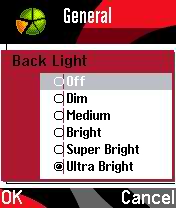
I've lost count of the number of reviews of the Sendo X I've
seen complaining about the fairly dim screen. Guys... Sendo turn the backlight
down by default to save battery life! You can easily crank it up to the maximum
using the (admittedly fairly well hidden) 'Profiles | Personalise | General |
Back Light' setting - change it to 'Ultra Bright'!- Treat Yourself
If you're in any way serious
about using a Sendo X (or any other Symbian smartphone) as a business and
productivity tool, treat yourself to a Bluetooth keyboard. The
ThinkOutside one works a treat and
will see you typing at up to 60 words per minute on your Sendo X. Go on, you
know you want to... There's a great 'official' Sendo plug-in keyboard, but this
won't work with other smartphones in future... your call.
- Think large
Buy the biggest SD or MMC card
you can afford, as always, to fit on a reasonable supply of music, apps and
video clips. If possible, format these on the Sendo X itself ('Extras |
Memory', and note that formatting takes a while!), to avoid problems. The
built-in player works well with MP3 files at 128kbps, so you can fit 8 hours of
CD-quality music on a cheap 512MB card. See the tip on OggPlay below if you
want to get 16 hours instead... 8-)
 Double the
music Double the
music
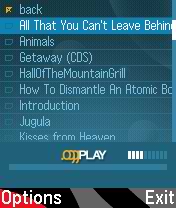
Why not double the amount of music you take with you? If you store
music files in the open source Ogg Vorbis format (.ogg), you'll find that they
stay CD quality even at 64kbps, equating to 16 hours of music on a 512MB card.
Normally you'd have to resign yourself to mono playback though, but the Sendo
X's audio processor means that music files are handled in stereo!
See the
links and tips in Music on the P800 and P900 for how
to do this (yes, I know the page talks about UIQ phones, but the idea's
identical)
(You'll need v1.0.7 of OggPlay if you've got the latest X
firmware)- Notes and look-ups
What about reference
material? You can't sync Outlook notes over to any Series 80 or Series 60
device, so what's the best approach? Mobipocket Reader is one good solution,
being free and supporting both compressed hypertext files (which you can build
yourself from Word, text or HTML sources) and plain text. For example, my
Trivopaedia works well in this format.
- Share your photos
Never mind the Kodak Online
(or similar) services usually bundled with your smartphone, why not share your
photos with others for free? Apart from GPRS transmission charges, you can
moblog very easily from a Symbian OS smartphone. Read on
for details.
- Keep it secret!
For secret stuff, you can use
ZipMan to incorporate an encrypted
document system that's also compatible with your desktop PC. For example, keep
that confidential spreadsheet or Word file of passwords safely hidden from
prying eyes. Simply put your secret file(s) in an encrypted ZIP file
('compressed folder' in Windows XP speak) and then keep this in your Messaging
Inbox on the 'X'. Open it up when needed, to read its contents!
 Outside
In Outside
In
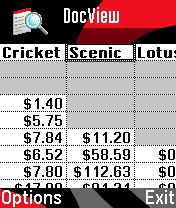
Quickoffice Premier won't work on the Sendo X because it's version of
Series 60 is too 'old', but don't miss the bundled program DocView, a licensed
port of Quick View Plus, which does a fair job of viewing (but not editing -
sorry!) any Office style document you care to throw at it. It's not fast and
it's not that pretty, but it will probably do the job.- The poor man's word processor
Perhaps you
need to enter lots of text, jotting down ideas or perhaps (with the aid of a
plug-in or Bluetooth keyboard)? You can't use Quickoffice Premier because it's
apparently not compatible with Series 60 v1.x smartphones 8-(. Don't despair
though, see my article on using the poor man's word
processor.
- Satellite navigation? Oh yes!
It's true that
the Sendo X can't run the latest TomTom GPS navigation software. And it doesn't
seem to like Wayfinder much. But it works just fine with Route 66's software, so chalk one more sale up for
them!
- Ignore those 'Exit' buttons!
Yes, the Sendo X
only has 6MB of RAM available to you, the user, but you can still have most of
your Series 60 apps running at the same time, which means no delays while
applications are launched. The trick is to ignore those 'Exit' buttons. When
you need to switch to a different application, press the Menu ('Applications')
button and select it from there, leaving the current app running. Or use the
tip below to switch between running programs directly.
[Caveat: watch out
for intensive apps like navigation programs, games or music players, which can
eventually drain your battery if left running all the time]
 Must-have
managers Must-have
managers
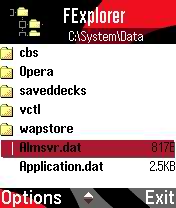
The two utilities every computer user needs are a system task
manager (i.e. what's running) and a file manager. The first is easy: just press
and hold the 'Applications' button (for more control, grab
DevMan) and then scroll up and down.
For a file manager, run, don't walk, and download
FExplorer. - Imaging basics
Viewing images is a staple
function of nearly all Series 60 smartphones, but make sure you know all the
shortcuts. With a photo on-screen, press '5' to zoom in by 25% in increments.
To zoom out, press '0' in the same way, or press and hold it to zoom out fully.
You can rotate the way the photo is viewed anti-clockwise by pressing '1' or
clockwise by pressing '3'.
- Speed launching applications
On any Menu
(applications) screen, you can press any of the numeric keys to instantly
launch the application or shortcut in the corresponding position on the 3 by 3
icon grid displayed. For example, pressing '7' actions whatever's in the bottom
left grid slot. (This only works for the first nine icons in any Menu
screen)
- Faster numbers
Whether it's entering a PIN
number into a security app or entering a phone number, it's right pain to have
to multi-tap each number key to get past the assigned letters and onto the
numbers. Much easier is to hold down a number key for half a second or
so - you'll find the right number is entered directly.
 The mobile Web The mobile Web
It's
great having Opera built-in, but the GPRS data tariff you're on may restrict
what you access. So, why not stick to mobile-friendly pages? Start your
browsing journey at the 3-Lib web guide and all
should go well. - Steer clear of MP4, OK for DVD
When preparing
video clips for playback on the Sendo X, make sure to use the standard H.263
codec and not a variant of MPEG-4 (as used in some other parts of the Symbian
world). If you're not sure, simply stick to using the free
Nokia Multimedia
Converter 2.0. And if your video source is a DVD rather than a home-brewed
AVI or MPEG, use DVD-to-Mobile, whose
Series 60 version is quite excellent.
- The ones you love the most
If you get fed up
scrolling down the Menu screen lookng for your favourite applications
again, why not shuffle things round so that the apps you use the most
are clustered right at the top? Highlight an icon and use 'Move', and you'll
find you can re-insert it anywhere in the list. If you have lots of favourites,
make the most of the folder system (e.g. 'Games') and then put these folders
near the top of the list, for speedy access.
Or, of course, use the Now!
screen's History and Favourites panes...
- When is an X not an X?
In web forms etc,
you'll not always see 'Sendo X' listed. In such cases, try 'Nokia 3650', whose
underlying OS is of the same vintage. This has worked well for me.
- Oh yes...
and there are of course lots of
good, free Series 60 games and applications available for
download, just install them to a corner of your expansion card in the usual
Symbian way. Have fun!
|


